12 Jan
Identifying Your Specific Business Requirements
Before investing in hardware, you must evaluate the unique operational needs of your industry. A busy restaurant requires a system with table management features, whereas a retail boutique might prioritize inventory synchronization tools. By mapping out your daily workflows, you can determine whether you need a stationary countertop unit or a handheld device that allows for mobile transactions. Selecting a terminal that aligns with your specific niche ensures that you don’t pay for unnecessary features while securing the tools essential for your success.
Prioritizing Connectivity and Mobility Options
In today’s fast-paced market, a lost internet connection can mean lost revenue. When choosing a POS terminal, look for multi-channel connectivity options, including Wi-Fi, Ethernet, and 4G/5G SIM card support. For businesses that operate on the move, such as food trucks or pop-up shops, long battery life is a non-negotiable factor. Ensuring your hardware can maintain a stable connection in any environment prevents checkout delays and keeps your customer service standards high, regardless of your physical location.
Evaluating Software Compatibility and Integration
The hardware is only as powerful as the software it runs. Your chosen POS terminal should offer seamless API integration with the tools you already use, such as accounting software, CRM systems, and e-commerce platforms. Many modern merchants are moving toward Android-based platforms because they support a wide range of third-party applications. A terminal that “talks” to your other business systems eliminates manual data entry, reduces errors, and provides a unified view of your entire operation.
Assessing Payment Method Versatility
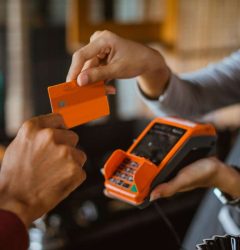
Modern customers expect to pay with more than just physical credit cards. To maximize your sales potential, your terminal must support diverse payment processing, including EMV chip, magstripe, and NFC contactless payments like Apple Pay and Google Pay. Additionally, as global commerce evolves, consider hardware that can handle QR code scanning for digital wallets and alternative payment methods. Providing a variety of options ensures that you never turn away a customer due to hardware limitations.
Focusing on Durable Design and Ergonomics
A POS terminal is a high-traffic tool that must withstand the rigors of daily use. For high-volume environments, ruggedized hardware construction is essential to prevent damage from spills, dust, or accidental drops. Beyond durability, consider the user-friendly interface and ergonomic design for your staff. A terminal with a responsive touchscreen and an intuitive layout reduces physical strain on employees and speeds up the checkout process, leading to a more efficient workplace and happier customers.
Analyzing Total Cost of Ownership
When selecting a terminal, look beyond the initial price tag to understand the total cost of ownership (TCO). This includes transaction fees, monthly software subscriptions, and potential maintenance costs. Some providers offer low upfront costs but higher processing fee structures, which can eat into your margins over time. Compare different pricing models and check for hidden costs like setup fees or contract termination penalties to ensure the hardware remains a profitable investment for your business in the long run.
Conclusion
Choosing the right POS terminal is a pivotal decision that directly impacts your business’s efficiency and customer satisfaction. It is not just about processing payments; it is about finding a strategic partner for your daily operations. By carefully considering your industry needs, connectivity requirements, and the total cost of ownership, you can select a device that not only handles today’s transactions but also scales with your future ambitions. The right technology will empower your staff, secure your data, and provide the professional experience your customers expect, laying the groundwork for sustained business growth.
Frequently Asked Questions
Should I choose a handheld or a desktop POS?
Choose handheld for mobility and line-busting, or desktop for high-volume stationary checkouts like grocery stores.
Does the POS terminal come with software pre-installed?
Most professional terminals come with a base OS, but you may need to choose a specific software subscription for your industry.
What is the difference between a Smart POS and a traditional one?
Smart POS systems use app-based software and cloud connectivity, while traditional ones are often offline and limited to payments only.
Can I use my existing bank with any POS terminal?
Not always; you must ensure the hardware is compatible with your payment processor’s gateway and security protocols.
Is a built-in printer better than an external one?
Built-in printers save space and are more portable, while external printers are often faster for heavy-duty printing needs.
What kind of support should I expect with my hardware?
Look for providers that offer 24/7 technical support and remote device management to fix issues quickly.
How often do I need to replace my POS terminal?
Most high-quality terminals last 3 to 5 years before the hardware or operating system needs an upgrade for security.
Are there wireless POS terminals for outdoor use?
Yes, many models feature rugged designs and 4G connectivity specifically for outdoor and mobile business use.
Can a POS terminal handle multiple currencies?
Yes, many modern systems support Dynamic Currency Conversion (DCC) for international customers.
Do I need a separate scanner for barcodes?
Many Android-based POS terminals have built-in cameras or laser scanners, but you can also attach external ones via USB or Bluetooth.